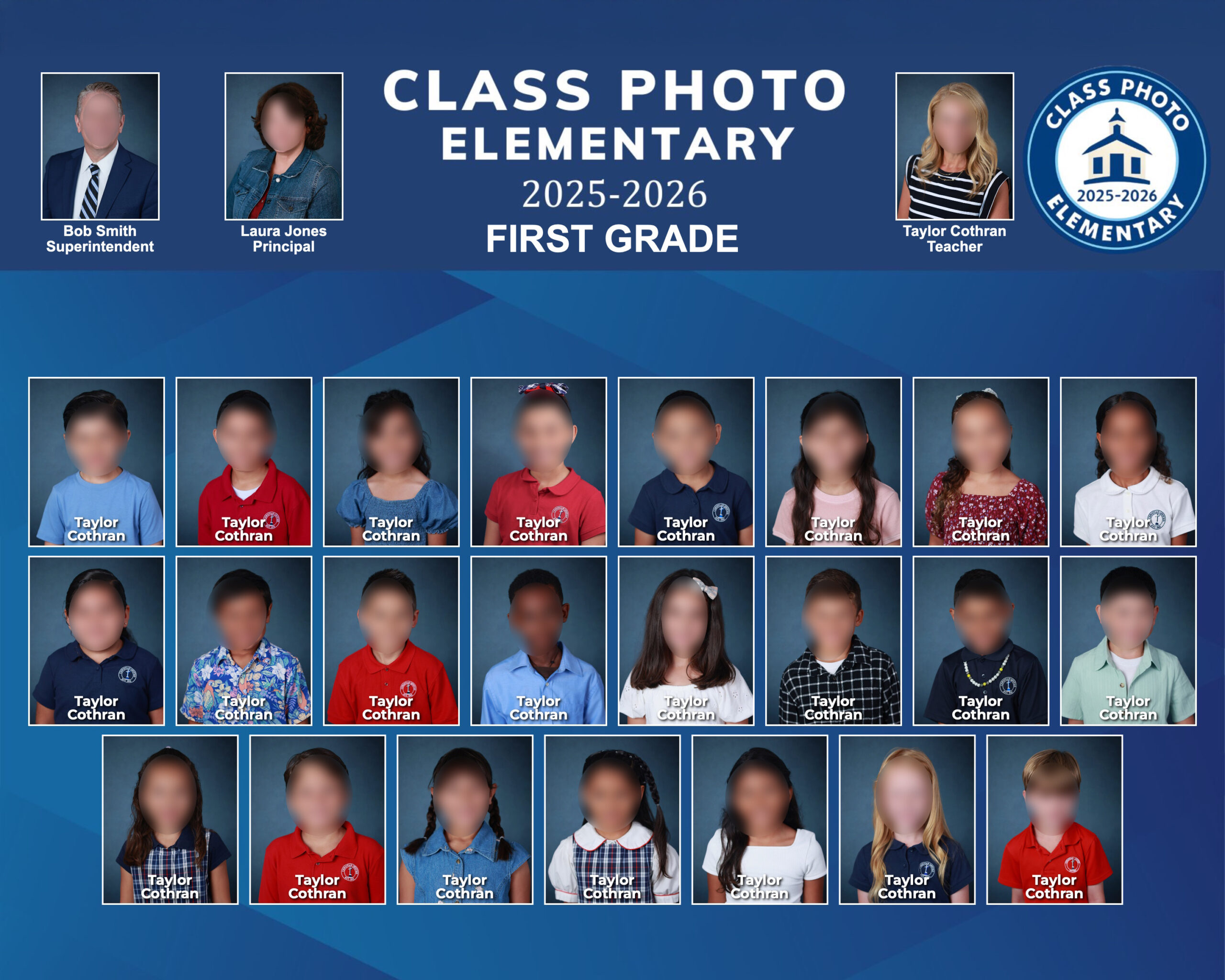
Real output
See what ClassPhoto creates.
This is an actual class composite generated by ClassPhoto — clean layout, branded, and print-ready in minutes.
Turn your GotPhoto zip export into beautiful class composites in minutes. Custom or stock backgrounds, your own logo, multiple print sizes, and full school composites up to 220 students.
The problem
You already spent hours photographing every student. Now you're stuck dragging individual portraits into templates, fighting clunky software, and praying nothing crashes before you save. There's a better way.
Real output
This is an actual class composite generated by ClassPhoto — clean layout, branded, and print-ready in minutes.
How it works
Export your class photos from GotPhoto (or any tool that organizes by class folder) and drop the zip file right in.
Pick a stock background or upload your own. Add your school logo, choose your print size, and you're set.
Hit generate and watch every class composite build itself. Download them all and deliver to your client.
Features
Everything you need to go from raw exports to finished composites, fast.
Drag and drop your export file. ClassPhoto reads the folder structure and organizes every class automatically.
Choose from included stock backgrounds or upload your own for a look that matches your studio's style.
Up to six header spots for your logo, principal, superintendent, or aides — and the class teacher is matched to every class automatically.
Choose from several print sizes to match your lab's specs and your client's needs — no manual resizing required.
Generate a full school composite with up to 220 students in just a few clicks — perfect for yearbooks and lobby displays.
Generate composites for every class at once. No more building them one at a time.
Add, remove, or replace any student's photo and correct names without starting over. Other tools make you rebuild from scratch — ClassPhoto doesn't.
Download print-ready composites at full resolution, ready to deliver to schools and parents.
A real page renders as you design — every color, font, and layout choice shows up instantly before you ever upload a photo.
Eight hand-picked fonts — classic serif, yearbook caps, friendly rounded, script — for title lines that match your school's personality.
Your session saves itself as you work. Close the tab, come back tomorrow, and every class and photo is right where you left it.
Step-by-step video tutorials on YouTube walk you through everything from your first import to your finished composites.
Compare
Other tools make you fight the software. ClassPhoto lets you fix mistakes, swap photos, and edit names — without starting over.
| Feature |
ClassPhoto
$89/yr
|
QComposite
$149/yr
|
|---|---|---|
| Editing & corrections | ||
| Edit names directly in your layout | Yes | NoNames pulled from filenames |
| Remove or update students instantly | Yes | ManualRe-import required |
| Swap photos without re-importing | Yes | No |
| Fix teacher names anytime | Yes | ManualRename file & re-import |
| Built-in alerts for multi-part names | Yes | No |
| No restarting over small mistakes | Yes | Often required |
| Output & delivery | ||
| Auto-generate PDF proofs for schools | Yes | No |
| Export high-res JPEGs (print-ready) | Yes | Yes |
| Batch generation (all classes at once) | Yes | Yes |
| Setup & workflow | ||
| Import from GotPhoto zip | Yes | Yes |
| Custom & stock backgrounds | Yes | Custom only |
| Multiple print sizes | Yes | No |
| Full school composite (up to 220 students) | Yes | No |
| Web-based (no install needed) | Yes | Desktop app |
| Layout creation | SmartAuto-arranges rows to fit the page based on student count | YesFull layer editor |
| Pricing | ||
| Annual price | $89 | $149 |
| Unlimited composites | Yes | Yes |
Pricing
No per-school fees. No per-composite limits. One price, unlimited use — at an introductory rate through September 30, 2026.
$89/yr
Introductory rate — expires September 30, 2026.
Billed annually. Instant access.
Get instant access to ClassPhoto and start generating composites today.
Buy Now — $89/yearSupport & FAQ
Most questions are answered below. Please check the FAQ first — it covers almost everything that comes up.
Yes. ClassPhoto runs entirely in your web browser, so it works on Mac, Windows, Chromebook, or any other computer. There's nothing to download or install — you just log in and go.
You'll need:
That's it. No special graphics card, no minimum RAM, no installer. If you can browse the web, you can run ClassPhoto.
ClassPhoto is built around the zip file structure that GotPhoto exports, so it works perfectly with GotPhoto out of the box. If you use a different system that can export your photos organized into folders by class, there's a good chance ClassPhoto will work with that too.
Not sure? Use the contact form at the bottom of this page to send us a sample of your export file structure and we'll take a look before you buy.
ClassPhoto is a digital product with instant access, so all sales are final. We keep it affordable at $89 a year and put everything you need to evaluate it right on this page — the feature list, the comparison with other tools, and a real sample composite generated by the app.
That said, if something is genuinely broken — the app won't load, your license key never arrived, the software isn't working as described — reach out through the contact form below and we'll make it right. Payments are processed by Lemon Squeezy, who acts as our merchant of record.
ClassPhoto is $89 per year — an introductory rate available through September 30, 2026. Your subscription renews automatically on the anniversary of your purchase so your access never lapses. You'll get an email receipt from Lemon Squeezy each time you're billed, and you can cancel at any time — no phone calls, no guilt trips.
Your photos are processed through our secure app so ClassPhoto can build composites from them. We don't share your files, and we don't use them for any purpose other than generating your composites. Your work is your work.
If you have specific questions about data handling for a school client, reach out through the contact form below and we'll walk you through it.
Yes — scroll up to the "Real output" section of this page. That's an actual composite generated by ClassPhoto, not a marketing mockup. The feature list and comparison chart cover exactly what the app does and doesn't do, so you can evaluate it against what you currently use.
If you have a specific question about your workflow before buying, use the contact form at the bottom of this page and we'll answer it honestly.
Checkout is handled by Lemon Squeezy, which accepts all major credit and debit cards, plus Apple Pay, Google Pay, and PayPal in most regions. You'll get a receipt by email the moment your payment clears, with your license key included.
You have a few ways to get it back:
Inside the app, click the upload area (or drag your zip file onto it) and select the export file you downloaded from GotPhoto. ClassPhoto reads the folder structure, sorts every student into the correct class, and pulls their names from the filenames automatically.
Don't unzip the file first — upload it as a .zip. ClassPhoto handles the unpacking.
If you already unzipped it to take a peek, here's how to zip it back up:
On a Mac:
.zip file right next to the folder — upload that oneOn Windows:
.zip file — upload that oneZip the folder itself, not a selection of files inside it — ClassPhoto needs to see the class folder structure exactly the way GotPhoto exported it.
Most export issues come down to one of these:
If none of those fix it, use the contact form below and describe what you're seeing — what step you were on, what the error message said (if any), and what browser you're using. We'll help you sort it out.
Open the class, click into the student's name, and type the fix. No need to rename files, re-import, or start the class over — the composite updates with the corrected name.
This is one of the biggest differences between ClassPhoto and other composite tools — you fix the mistake where you see it, not by digging through folders.
Open the class you want to edit, then:
Backgrounds: JPG or PNG, at least 3000 pixels wide for print-quality results. Horizontal orientation works best.
Logos: PNG with a transparent background so your logo sits cleanly over the composite. At least 800 pixels on the longest side.
If your files don't quite meet those specs, ClassPhoto will still use them — the composite just won't look as crisp when printed large.
Yes. Your license key can be activated on a reasonable number of devices — typically your studio desktop and a laptop. If you hit the activation limit and need another slot (say you got a new computer), use the contact form below and we'll reset it for you.
Yes. Once you've built your composites, you can export the whole batch as PDF proofs in one click — perfect for emailing to the school admin or teacher for name-check and approval before you print.
When you generate and download composites, they save to your computer's default Downloads folder as high-resolution JPEGs (or as a zip of all of them if you're batch-exporting). From there you can upload them to your lab, email them to the school, or organize them however you like.
You can cancel anytime directly through Lemon Squeezy:
Your access stays active until the end of your current billing period, then your license key will stop working. There are no partial-year refunds, but you're welcome to keep using it until your year runs out.
If you run into any trouble canceling, reach out through the contact form below.
Reach out through the contact form below as soon as you notice. We can't guarantee a refund on renewals, but if it just happened and you haven't used ClassPhoto since the renewal, we'll take a look at your situation. We're not trying to keep money from people who genuinely don't want the product anymore.
To avoid this in the future, you can cancel your subscription any time at app.lemonsqueezy.com/my-orders and keep your access through the end of your current billing period.
No. The final JPEG and PDF files you've already downloaded are yours to keep forever — they live on your computer. If your subscription lapses, you lose access to the app (so you can't generate new composites until you renew), but nothing you've already created goes anywhere.
Totally fair. Use the contact form right below this FAQ to tell us what's going on — even if it's something we haven't covered above — and a real human will get back to you within two business days. The more detail you can give us (what step you were on, what you expected to happen, what actually happened), the faster we can help.
Fill out the form below and a real human will get back to you within two business days (Monday–Friday, Pacific Time).
We'll get back to you within two business days. Keep an eye on your inbox (and your spam folder, just in case).